
Tutorial
How to Import a Book or Article Into Lira
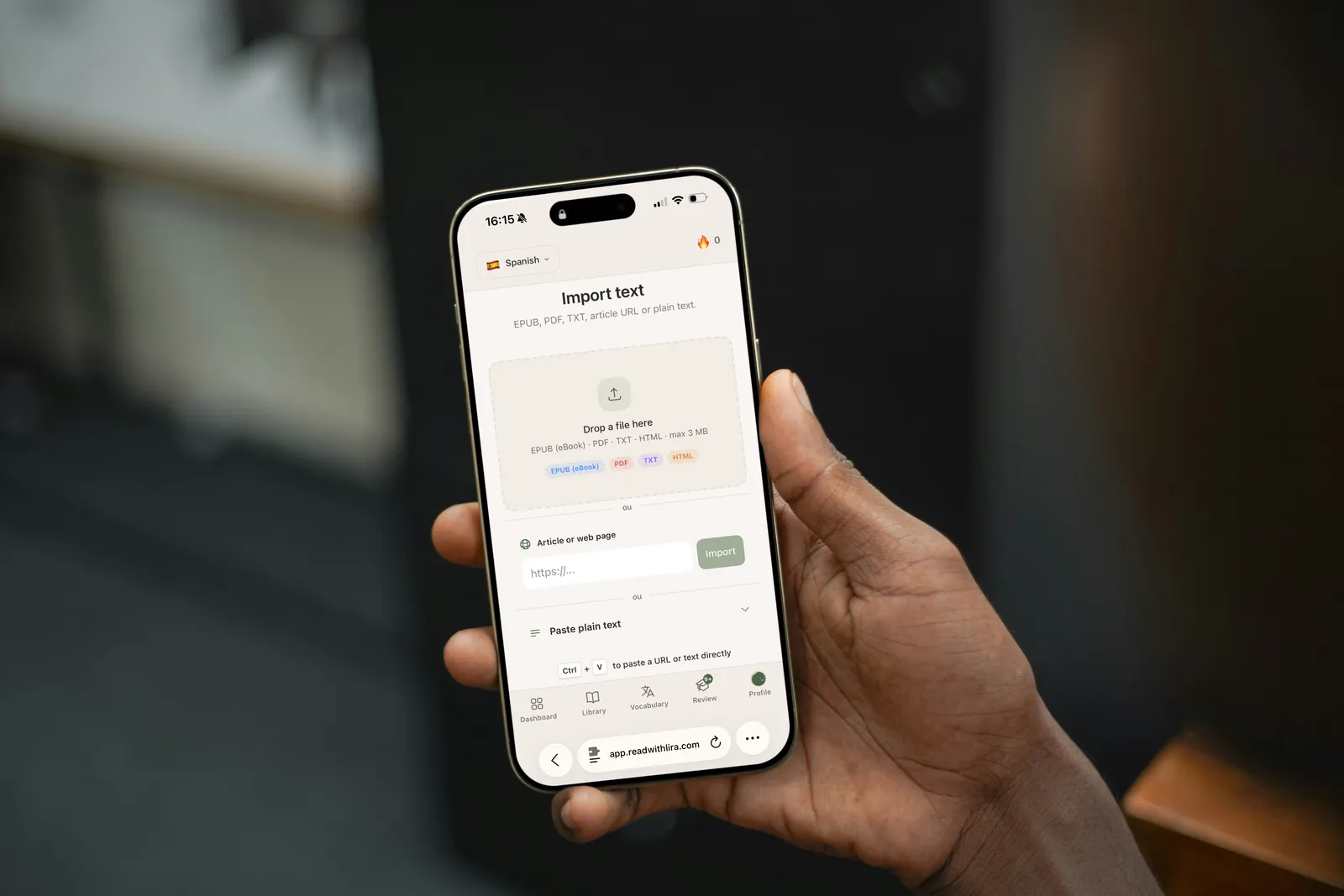
Importing a text on Lira: paste it, drop a file, ready to read in seconds.
What file formats can you import into Lira?
Lira accepts four types of input: an EPUB file, a PDF file, an article URL, or pasted plain text. This flexibility covers most of the reading sources a learner already uses daily, with no prior conversion needed.
Each format has a natural use case. EPUB suits novels and digital books you've bought or downloaded legally. PDF suits scanned documents, textbooks, or academic articles. URL suits a news or blog article found online. Plain text suits any content already on hand, an email, a Word document, a personal note.
How do you import an EPUB file?
To import an EPUB, open the import section, choose "File", then select your EPUB from your device. Lira automatically extracts the text and splits it by chapter, ready to read within seconds.
EPUB's advantage comes from its structure: metadata (title, author, chapters) is already embedded in the file, which avoids manual formatting. It's the most reliable format for a clean import, without truncated text or broken layout.
In our own daily use, EPUB consistently gives the most faithful result compared to the original, especially for novels with a clear chapter structure.
If your EPUB comes from a store with DRM protection, import may fail. Check that the file is a DRM-free EPUB before importing.
How do you import a PDF file?
For a PDF, the process is identical: import section, "File", select the PDF. Lira reads the text contained in the document and prepares it for word-by-word assisted reading.
One thing to watch for: scanned PDFs saved as images rather than digital text. If the document is a photo of pages rather than actual text, extraction can be imperfect or impossible, since there's no text to read, only an image.
For best results, prefer PDFs generated directly from a word processor or downloaded from a digital source (academic article, ebook, official document) rather than a paper scan.
How do you import an article URL?
To import a web article, simply paste its URL into the dedicated field. Lira automatically retrieves the page's main content, excluding menus, ads, and navigation elements that don't serve reading.
This method works well for reading news in your target language: an article from The Guardian for English, Der Spiegel for German, El País for Spanish. It's also a good way to follow current events while learning, with fresh content every day.
Some sites protect their content behind a strict paywall, which can prevent full extraction. In that case, look for a freely accessible article, or copy the text directly using the plain text option.
If you already use a click-to-translate extension like Readlang on pages like these, Lira's import works on the same principle, without depending on your browser or an installed extension.
How do you paste plain text?
The plain text option works for anything you already have on hand: an email, a document excerpt, a personal note, or a passage copied from a source that doesn't lend itself to file or URL import.
Simply paste the text into the field provided, add a title if you want to find it easily later, and start reading. It's the fastest option when you have short content ready, with no file to manage.
How do you pick a text from the classics library if you have nothing on hand?
If you don't have a text to import, Lira's built-in library gives access to public-domain classics from Project Gutenberg, which lists more than 70,000 free books across many languages (Project Gutenberg, 2024).
This library is free and covers all five languages supported by Lira: French, English, German, Spanish, and Italian. You'll find novels, short stories, and essays already sorted by language, with no external search required.
Public-domain classics have an often underrated advantage for language learning: their vocabulary, though sometimes dated, tends to be structured and repetitive from chapter to chapter, which makes memorization easier through repeated word exposure.
Curious why this pairs well with gamified apps? Our piece on the Duolingo plateau explains why reading real content complements gamified exercises.
How do you get started well with your first text?
Choosing the right difficulty level for your first text is the single most important factor in not giving up after a few pages. A text that's too hard, with more than one unknown word in five, drains motivation quickly.
A solid rule of thumb, shared by many language teachers, is to aim for a text where about 90% of the vocabulary is already familiar. That leaves enough new words to make progress, without overwhelming overall comprehension.
Turn on contextual translation from the start: tapping an unknown word shows its translation directly inside the text, without interrupting your reading. Saved words then move automatically into spaced repetition using FSRS, a memory-scheduling method also used by the Anki app (FSRS, GitHub, 2024).
Finally, favor consistency over session length. Fifteen minutes of daily reading with a well-matched text usually produces more progress than one long weekly session on a text that's too ambitious.
Frequently asked questions
What file formats does Lira accept? Lira accepts EPUB and PDF files, article URLs, and pasted plain text. No file conversion is needed beforehand.
What if my EPUB won't import? Check that it isn't protected by digital rights management (DRM). A DRM-free EPUB imports normally within seconds.
Can you read a paywalled news article? Not always through automatic URL import. In that case, copy the article text using the plain text option if you have legal access to it.
How do I pick a text that matches my level as a beginner? Aim for a text where about 90% of the vocabulary is already familiar. The Project Gutenberg classics library, sorted by language, is a good free starting point.
See also our Lira FAQ for full details on supported languages and levels.
Claire
Editor at Lira, self-taught in 3 languages, she tests every method or tool before writing about it.
Start reading in your target language
Import a book, an article, or pick a free classic, and Lira translates unknown words as you go.
Start for freeRelated articles
Readlang alternative: read without free plan limits
Readlang caps phrase translations and context explanations on its free plan. Here's what Lira does differently, no filler.

How FSRS spaced repetition works in Lira
FSRS calculates the optimal review interval for every word you learn. Here's exactly how that works in Lira, word by word.
The Duolingo Plateau: Why You Stall (and How to Fix It)
Finished the Duolingo tree but still can't read a simple article? Here's why the plateau happens and how Lira helps you move past it.